User Tracking
The Users view provides an overview of all users. It also offers an in-depth look into individual users. It's easy to map data in Langfuse to individual users. Just propagate the userId attribute across observations. This can be a username, email, or any other unique identifier. The userId is optional, but using it helps you get more from Langfuse aggregating metrics such as LLM usage cost by userId. See the integration docs to learn more.
When using the @observe() decorator:
from langfuse import observe, propagate_attributes

@observe()
def process_user_request(user_query):
    # Propagate user_id to all child observations
    with propagate_attributes(user_id="user_12345"):
        # All nested observations automatically inherit user_id
        result = process_query(user_query)
        return result
When creating observations directly:
from langfuse import get_client, propagate_attributes

langfuse = get_client()

with langfuse.start_as_current_observation(
    as_type="span",
    name="process-user-request"
) as root_span:
    # Propagate user_id to all child observations
    with propagate_attributes(user_id="user_12345"):
        # All observations created here automatically have user_id
        with root_span.start_as_current_observation(
            as_type="generation",
            name="generate-response",
            model="gpt-4o"
        ) as gen:
            # This observation automatically has user_id
            pass
When using the context manager:
import { startActiveObservation, propagateAttributes } from "@langfuse/tracing";

await startActiveObservation("context-manager", async (span) => {
  span.update({
    input: { query: "What is the capital of France?" },
  });

  // Propagate userId to all child observations
  await propagateAttributes(
    {
      userId: "user-123",
    },
    async () => {
      // All observations created here automatically have userId
      // ... your logic ...
    }
  );
});
When using the observe wrapper:
import { observe, propagateAttributes } from "@langfuse/tracing";

// An existing function
const processUserRequest = observe(
  async (userQuery: string) => {
    // Propagate userId to all child observations
    return await propagateAttributes({ userId: "user-123" }, async () => {
      // All nested observations automatically inherit userId
      const result = await processQuery(userQuery);
      return result;
    });
  },
  { name: "process-user-request" }
);

const result = await processUserRequest("some query");
See JS/TS SDK docs for more details.
from langfuse import get_client, propagate_attributes
from langfuse.openai import openai

langfuse = get_client()

with langfuse.start_as_current_observation(as_type="span", name="openai-call"):
    # Propagate user_id to all observations including OpenAI generation
    with propagate_attributes(user_id="user_12345"):
        completion = openai.chat.completions.create(
            name="test-chat",
            model="gpt-3.5-turbo",
            messages=[
                {"role": "system", "content": "You are a calculator."},
                {"role": "user", "content": "1 + 1 = "}
            ],
            temperature=0,
        )
Use propagate_attributes() with the CallbackHandler:
from langfuse import get_client, propagate_attributes
from langfuse.langchain import CallbackHandler

langfuse = get_client()
handler = CallbackHandler()

with langfuse.start_as_current_observation(as_type="span", name="langchain-call"):
    # Propagate user_id to all observations
    with propagate_attributes(user_id="user_12345"):
        # Pass handler to the chain invocation
        chain.invoke(
            {"animal": "dog"},
            config={"callbacks": [handler]},
        )
Use propagateAttributes() with the CallbackHandler:
import { startActiveObservation, propagateAttributes } from "@langfuse/tracing";
import { CallbackHandler } from "@langfuse/langchain";

const langfuseHandler = new CallbackHandler();

await startActiveObservation("langchain-call", async () => {
  // Propagate userId to all observations
  await propagateAttributes(
    {
      userId: "user-123",
    },
    async () => {
      // Pass handler to the chain invocation
      await chain.invoke(
        { input: "<user_input>" },
        { callbacks: [langfuseHandler] }
      );
    }
  );
});
Note on Attribute Propagation
- Values must be strings ≤200 characters
- Call early in your trace to ensure all observations are covered. Only the currently active observation and observations started while the context is active receive the attributes — observations started earlier are not retroactively updated. This way you make sure that all Metrics in Langfuse are accurate.
- Invalid values are dropped with a warning
Scope and ordering of userId propagation
Propagation is forward-only and follows the active execution context:
- Covered: the observation that is currently active when you enter the propagation context, and every observation started while the context is active (any nesting depth, any type).
- Not covered: observations started before entering the context. In the Python SDK, a detached root created with
start_observation()(which does not become the active span) stays unstamped if you enterpropagate_attributesafterwards — start it inside the context, or usestart_as_current_observationfor the root and propagate within it.
Where the value lands: each covered observation carries user.id in the exported OTel span data, and after ingestion userId surfaces as a trace-level field. When verifying programmatically, read it from the trace (langfuse.api.trace.get(trace_id).user_id) — observation objects returned by the public API do not expose a user_id field, so asserting on fetched child observations will always fail.
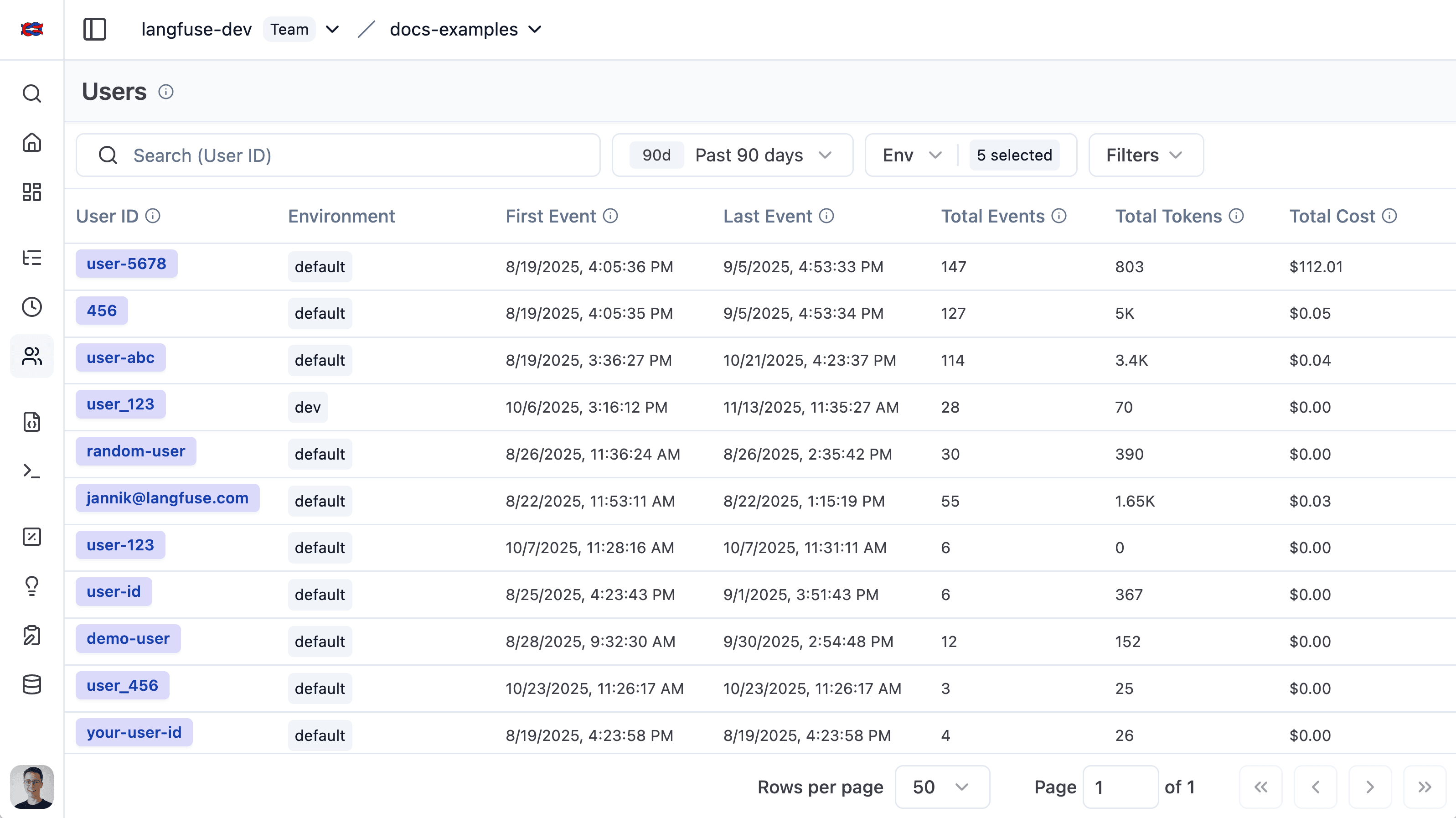
View all users
The user list provides an overview of all users that have been tracked by Langfuse. It makes it simple to segment by overall token usage, number of traces, and user feedback.
Individual user view
The individual user view provides an in-depth look into a single user. Explore aggregated metrics or view all traces and feedback for a user.
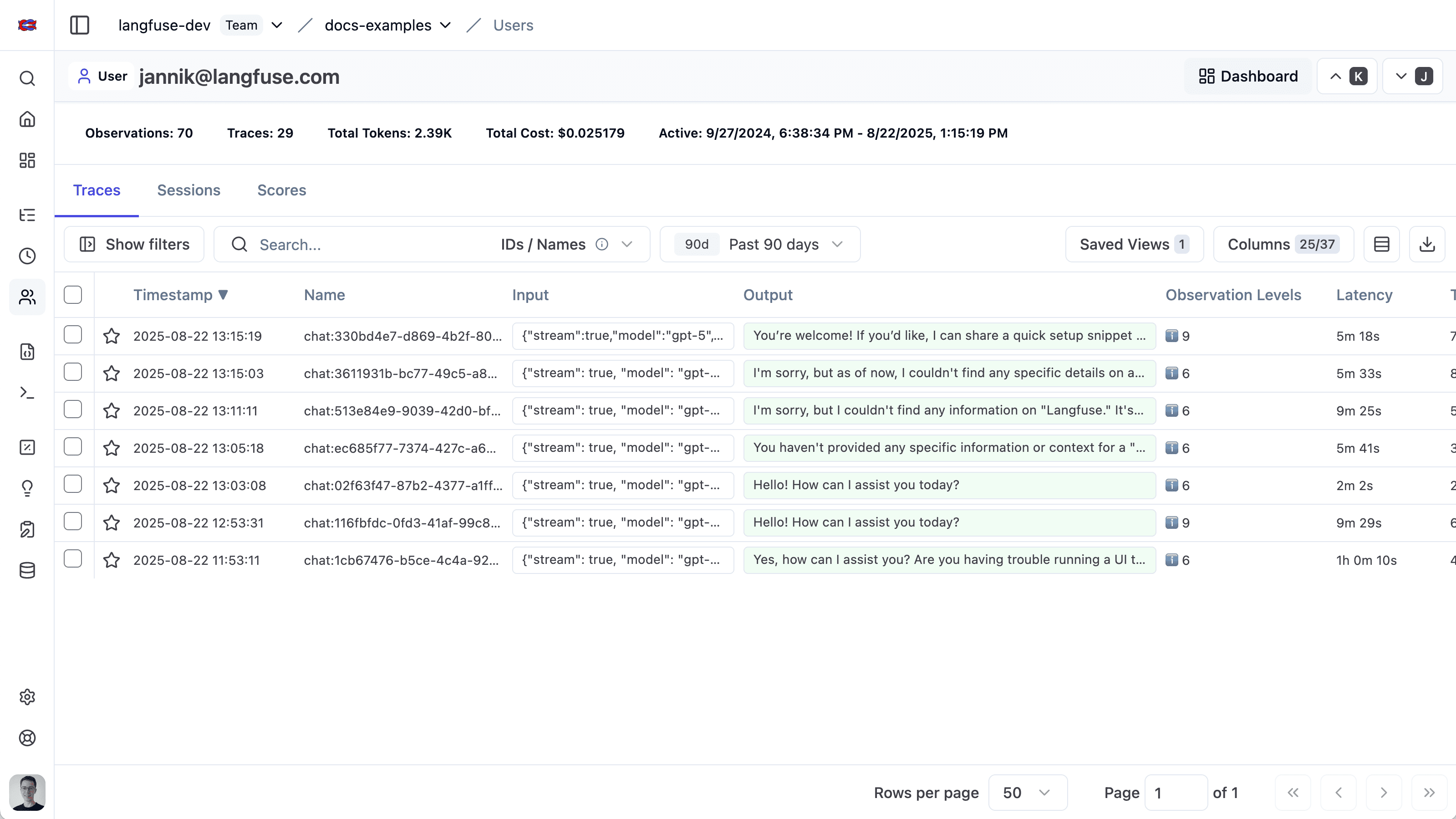
You can deep link to this view via the following URL format: https://<hostname>/project/{projectId}/users/{userId}
Related Resources
- Build custom dashboards to visualize user-level metrics such as cost, token usage, and trace counts.
- To programmatically query aggregated per-user metrics such as cost, token usage, and trace counts, use the Metrics API.
GitHub Discussions
Last edited


